


UNO!™
4.368.57K Reviews
App Specs
- Version
- 1.17.5378
- Updated On
- License
- Free
- Downloads
- 100,000,000+
- Developer
- Mattel163 Limited
- Categories
- Card
- Platform
- Android, iOS
Screenshots

 Analysis by AppCompare
If you’ve ever been caught up in the excitement of a fast-paced card game night, then UNO!™ is definitely going to be your jam. Available on both Android and iOS, this app brings the classic card game to your fingertips, letting you play whenever the mood strikes. So, what’s the deal with this digital version of a beloved classic? Let’s dive in and see what it has to offer.
A familiar table in your pocket
My first impression is that this is less about learning a new card game and more about finding a quick way back into one I already know. The colorful cards and animated turns make the action easy to follow on a small screen, while the familiar rules keep the barrier to entry low. Mattel163 Limited develops the game, and the presentation aims to make a solo phone session feel lively rather than like staring at a static deck.
That quick access is useful in ordinary moments: I can imagine opening a match while waiting for a ride, then stopping when I reach my destination. It also works when friends are together but not in the same place, since online play removes the need to gather around one physical table. The trade-off is that a phone game is not quite the same as passing cards around a room. If your favorite part is reading everyone’s reactions and teasing each other face to face, a real deck remains the better choice.
Guides and Analysis on UNO!™
The Thrill of the Game
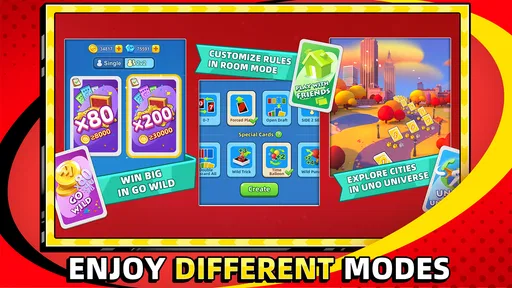
One of the standout features of the UNO!™ app is how it captures the thrill of the traditional card game while adding a modern twist. You’re not just stuck playing with friends nearby; you can connect with players from around the world. The app offers a variety of modes, including the classic mode we all know and love, and a few new twists like Go Wild and Room Mode. These additions keep things fresh and exciting, making sure there’s never a dull moment.
The app is designed with vibrant colors and animations that pop right off the screen. It’s as if they’ve managed to bottle up the energy of an in-person game night and translate it into a digital experience. The user interface is intuitive, so even if you’re not tech-savvy, you’ll be navigating the game like a pro in no time.
Visual cues, sound, and pacing
The visual style gives each turn a clear sense of movement: cards change, effects animate, and the table feels active without requiring me to study a complicated interface. That matters in a game where the useful information is simple but the pace can pick up quickly. I can focus on the colors and numbers in play instead of hunting through menus, which makes short sessions feel approachable.
Audio and animation can add energy, but they also make this a game I’d choose differently depending on where I am. In a quiet waiting room or while someone else is working nearby, I’d keep the phone muted and follow the on-screen action. The basic game remains readable without turning a public space into a noisy one. At home, the livelier presentation better suits the playful mood. This is a small but practical distinction: the app is convenient in many settings, yet its most animated feel is not always the right fit for every setting.
Worth Reading Before You Choose

Flipboard Shows What News Apps Must Do Beyond the Feed

Switching to Android Auto Means Rethinking Your Driving Routine

Google Calendar Makes a Crowded Week Easier to Manage

Ludo King Makes the Most of the Minutes Between Plans

ESPN’s Live Game View Makes Following Close Games Easier

QuizzLand Review: A Good Fit for Short Trivia Breaks, Not Every Player
Its rhythm comes from alternating between quick decisions and waiting for other players. A hand can move briskly when everyone acts promptly, but online play naturally depends on other people’s turns and connection. I wouldn’t open it expecting every match to fit a precise gap in my schedule. If I have only a moment, I may prefer to leave a game for later rather than risk being interrupted halfway through.
Game Modes Galore
Let’s talk about the different modes you can dive into. Classic Mode is exactly what you’d expect - a straightforward, no-frills version of the game. But if you’re feeling adventurous, Go Wild mode spices things up with some unexpected twists. Room Mode is perfect if you want to set up a private game with your friends; it’s like having a virtual card table at your fingertips.
"I love being able to switch up the gameplay depending on my mood. It keeps things interesting!"
For a relaxed session, I’d start with Classic Mode: it keeps the familiar rules at the center and is the easiest place to get comfortable with the app’s controls. Go Wild is a better pick when the standard rhythm feels too predictable, while Room Mode makes most sense when you already have people in mind to play with. A useful habit is to decide what kind of session you want before joining: a simple familiar round, a more surprising variation, or a private game. That choice helps the modes feel meaningfully different instead of like extra buttons competing for attention.
Daily competitions and challenges add another layer of excitement. You can earn rewards and climb the leaderboards, which is a great way to keep coming back for more. It feels like every time you open the app, there’s something new to explore or achieve.
That ongoing layer is also where I’d set a boundary. If I want a quick card game, I can focus on a match and ignore the urge to chase every challenge; if I enjoy goals and rankings, they give a session a longer-term purpose. I would treat rewards as a bonus, not a reason to spend. The game is free to download, but it includes in-app purchases, with individual items ranging from $0.99 to $299.99. That range makes it sensible to check purchase choices carefully, especially if a child is playing or a device is shared.
Playing with friends and strangers
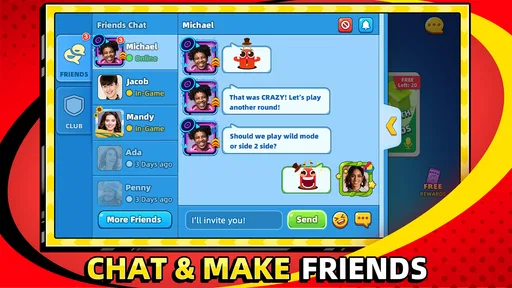
The social aspect of the game is a big part of its appeal. You can chat with other players, send them gifts, and even participate in team events. This feature makes the app not just a game, but a community. It's like having a global card game night anytime you want. Plus, the connectivity is pretty solid, so you won’t have to worry about dropping out of a game mid-hand.
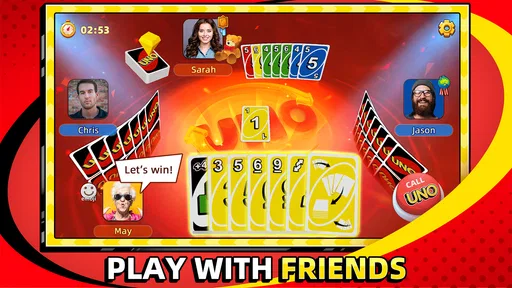
Room Mode is the option I’d choose for a planned catch-up with friends: agree on a time, open a private table, and let the game provide the shared activity even when nobody can meet in person. For spontaneous play, opponents from elsewhere mean there is no need to coordinate a group first. Those are different strengths. A private room is better for familiar company, while playing with strangers is useful when I simply want a match and do not have friends available.
Chat and gifts can make a match feel more social, but they are not essential to enjoying the card play. If I want a quieter, more focused session, I can treat the interaction as optional and concentrate on turns. If the point is conversation with people I know, I’d arrange a room rather than assume a public match will recreate the comfortable banter of a living-room game night. Online opponents bring variety, not the same personal connection as close friends around a table.
There’s something incredibly satisfying about beating an opponent from halfway across the globe, or teaming up with friends to tackle challenges together. It adds a layer of camaraderie that’s hard to find in many mobile games.
How it fits among card-game choices
Compared with a physical deck, this version saves the setup and makes it possible to play across distance, but it gives up the tactile feel and face-to-face reactions. Compared with a quiet single-player card game, its appeal is the interaction: turns against other people create unpredictability and make a familiar hand feel less scripted. That is also a limitation if I want complete control over pace or a game that never depends on other players. For those needs, a solo card game or the real deck on a table may be a better fit.
It suits people who already enjoy the simple pleasure of matching colors and numbers, want casual online company, or need an easy group activity when friends are apart. I’d be less inclined to recommend it to someone who dislikes competitive play, social features, recurring challenges, or purchase prompts in free games. It is rated for Everyone, but adults choosing it for younger players should still consider the online interactions and keep an eye on purchase settings. The age label is not a substitute for deciding what is comfortable for a particular child.
The game is free, has more than 100 million installs, and holds an average rating of 4.4 from around 2.5 million ratings, with roughly 67,000 written reviews. It was released on November 14, 2018, and the current version is 1.16.2959; Android devices need version 5.0 or later. Those details make it a well-established mobile option, though popularity alone cannot tell you whether its pace and social style suit you. I’d try a straightforward round first, then decide whether the extra modes and competitive goals add fun or simply more activity than I want.
Final Thoughts
In a nutshell, the app is a delightful adaptation of the classic card game. It’s perfect for quick matches during a coffee break or long gaming sessions on a lazy weekend. The variety of modes and the vibrant community make it a standout choice for both casual players and hardcore card game enthusiasts.
If you’re a fan of card games or just looking for a fun way to pass the time, give UNO!™ a try. You might just find yourself hooked on this colorful, fast-paced digital card game adventure.
Pros
- Smooth multiplayer experience.
- Daily rewards keep players engaged.
- Easy-to-use interface.
- Fun customization options.
- Quick matchmaking system.
Cons
- In-app purchases can be pricey.
- Occasional connectivity issues.
- Ads can interrupt gameplay.
- Limited offline features.
- Battery drain on extended play.
FAQs for UNO!™
What is UNO!™ and how does it differ from the traditional card game?
UNO!™ is the digital adaptation of the classic card game, available on Android and iOS. It maintains the same core rules but introduces new features such as online multiplayer modes, tournaments, and themed events. Unlike the traditional card game, UNO!™ offers an interactive experience with vibrant graphics and sound effects.
Is an internet connection required to play UNO!™?
Yes, an internet connection is necessary for most features in UNO!™. While you can enjoy some offline modes, the full experience, including multiplayer matches and events, requires online connectivity. This ensures players can compete with friends or global users in real-time and participate in leaderboards and challenges.
Are there any in-app purchases in UNO!™?
UNO!™ includes in-app purchases that allow players to buy coins, diamonds, and special cards to enhance gameplay. These purchases can unlock exclusive content or offer advantages in matches. While not mandatory to enjoy the game, they provide added convenience and customization options for players seeking a more personalized experience.
How can I play with friends in UNO!™?
Playing with friends in UNO!™ is straightforward. You can invite friends to join a game by connecting through social media accounts or sending them an invite link. The game also supports private rooms, allowing you to create and join matches with specific friends, ensuring a personalized and fun gaming session.
What safety measures are in place for younger players in UNO!™?
UNO!™ incorporates several safety features to protect younger players, including chat filters and parental controls. These measures prevent inappropriate language and interactions within the game. Parents can manage settings to limit interactions and ensure a safe, family-friendly gaming environment for their children.


